
Your RealPlane is parked at the gate. Where should it go next? Soon you can find out from the real world.
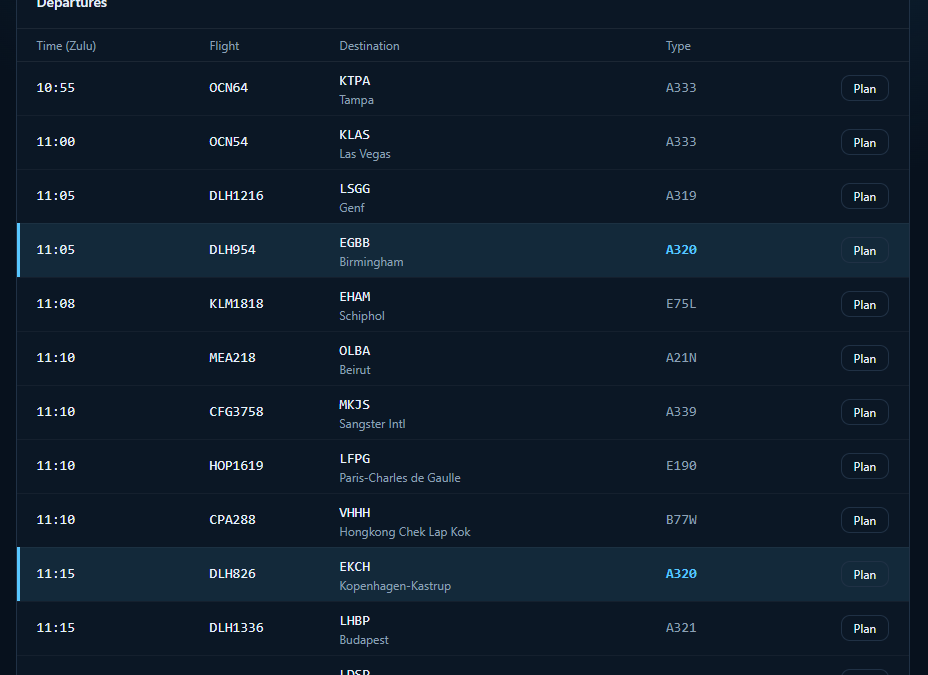
With RealFlights, each RealPlane page gets a new Departures board. It shows the real scheduled departures from the airport where your aircraft is parked right now. The data comes live.
How it works
- Open a RealPlane, for example D-AIND, and click Check departures.
- You get a list of real flights leaving that airport over the next two hours. Big hub or quiet regional field, the board fills up accordingly. Want to look further ahead? Click Load later.
- Flights operated with the same aircraft type as your RealPlane are highlighted. An A320 on the stand? The A320 departures stand out right away. You're free to pick any flight you like, though.
- Click Plan on the flight you want. Departure, destination and flight number are filled in for you. Your aircraft type is set, and you get a callsign suggestion based on your VA or airline prefix. The departure time is set to 15 minutes from now, in Zulu. Adjust whatever you like.
- Hit Plan in SimBrief. Your flight opens straight in SimBrief, ready to generate the OFP.
What you need
- A fsAirSync account
- Your SimBrief ID saved in your profile
- Permission to fly the RealPlane
Why it matters
RealPlanes already remember where the last pilot parked them. RealFlights adds the next step: a real flight from that spot, a plan in seconds, and then into the sim.
RealFlights is in final testing and will land soon. See you on the departure board! ✈️